I have been playing with my Jetson Orin Nano Super, trying to make it do things. It was touted as the Raspberry Pi for the AI age. What surprised me was how unfriendly it was to get it running out-of-the-box.
To run a simple stereo camera I had to run jetson-io.py which enables the CSI connectors to actually function and get the camera working. Then, I wrote specific ROS nodes that accessed the camera output using Gstreamer. I tried going headless and found out that the cameras apparently don't work unless they have an HDMI display attached!
But this blog is about how to get the dreaded GPIO pins running. I followed the basic jetson gpio tutorial to get set the pins to HIGH or LOW and it didn't work. All tutorials about Jetson's GPIO pins were very out of date. Nothing worked.
Then came JetsonHacks to the rescue. In this illuminating article, he explains the concept of Device Trees and how after JetPack 6.2, Nvidia thought it was a good idea to set all GPIO pins to be default input. The pins can be reconfigured using either jetson-io.py or by compiling Device Tree overlays.
Device Trees Helps the Jetson SoC get signals from the board. Its like a mapping of the pin names. Device Tree overlays helps us in augmenting those names and the properties of the pins to help jetson know how to treat a GPIO pin. The article goes into good detail about this. The code referenced in the Article didn't work. So me and codex got it working finally.
Here is my code to enable GPIO for many pins
pins_as_gpio.dts
/dts-v1/;
/plugin/;

/ {
    jetson-header-name = "Jetson 40pin Header";
    overlay-name = "Pins 7,29,31,33,35,37 gpio bidirectional";

    compatible = "nvidia,p3768-0000+p3767-0000",
                 "nvidia,p3768-0000+p3767-0001",
                 "nvidia,p3768-0000+p3767-0003",
                 "nvidia,p3768-0000+p3767-0004",
                 "nvidia,p3768-0000+p3767-0005",
                 "nvidia,p3768-0000+p3767-0000-super",
                 "nvidia,p3768-0000+p3767-0001-super",
                 "nvidia,p3768-0000+p3767-0003-super",
                 "nvidia,p3768-0000+p3767-0004-super",
                 "nvidia,p3768-0000+p3767-0005-super",
                 "nvidia,p3509-0000+p3767-0000",
                 "nvidia,p3509-0000+p3767-0001",
                 "nvidia,p3509-0000+p3767-0003",
                 "nvidia,p3509-0000+p3767-0004",
                 "nvidia,p3509-0000+p3767-0005";

    fragment@0 {
        target = <&pinmux>;

        __overlay__ {
            pinctrl-names = "default";
            pinctrl-0 = <&jetson_io_pinmux>;

            jetson_io_pinmux: exp-header-pinmux {

                hdr40-pin7 {
                    nvidia,pins = "soc_gpio59_pac6";
                    nvidia,tristate = <0x0>;
                    nvidia,enable-input = <0x1>;
                    nvidia,pull = <0x0>;
                };

                hdr40-pin29 {
                    nvidia,pins = "soc_gpio32_pq5";
                    nvidia,tristate = <0x0>;
                    nvidia,enable-input = <0x1>;
                    nvidia,pull = <0x0>;
                };

                hdr40-pin31 {
                    nvidia,pins = "soc_gpio33_pq6";
                    nvidia,tristate = <0x0>;
                    nvidia,enable-input = <0x1>;
                    nvidia,pull = <0x0>;
                };

                hdr40-pin33 {
                    nvidia,pins = "soc_gpio21_ph0";
                    nvidia,tristate = <0x0>;
                    nvidia,enable-input = <0x1>;
                    nvidia,pull = <0x0>;
                };

                hdr40-pin35 {
                    nvidia,pins = "soc_gpio44_pi2";
                    nvidia,tristate = <0x0>;
                    nvidia,enable-input = <0x1>;
                    nvidia,pull = <0x0>;
                };

                hdr40-pin37 {
                    nvidia,pins = "spi3_mosi_py2";
                    nvidia,tristate = <0x0>;
                    nvidia,enable-input = <0x1>;
                    nvidia,pull = <0x0>;
                };
            };
        };
    };
};
Here are a list of changes I did:
- Add the -super board into the compatible list. codex was able to decompile the exiting .dtbo in the /boot/ folder to find out the correct list.
- Enable GPIO for pins 7,29,31,33,35,37. Find the right names from either the pinsheet at Jetson Hacks or by decompiling.
- Compile using @
Here was my command: dtc -@ -I dts -O dtb -o pins_as_gpio.dtbo pins_as_gpio.dts
Just copy the resulting dtbo to /boot/
Then run sudo /opt/nvidia/jetson-io/jetson-io.py
Select Configure the 40 pins header and select the new pin overlay name. Save and reboot.
Enjoy!
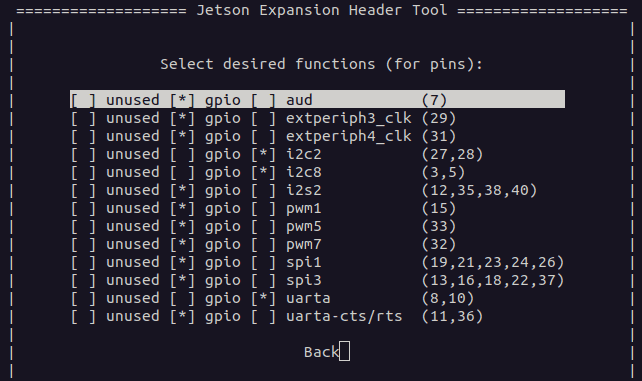
edit: upgrade to Jetpack 6.2.2 and jetson-io has support for enabling GPIO for pins inidividually!
Also check out my ROS MCP! https://www.npmjs.com/package/ros-mcp